Feature

Email Editor is now LIVE inside Pencil
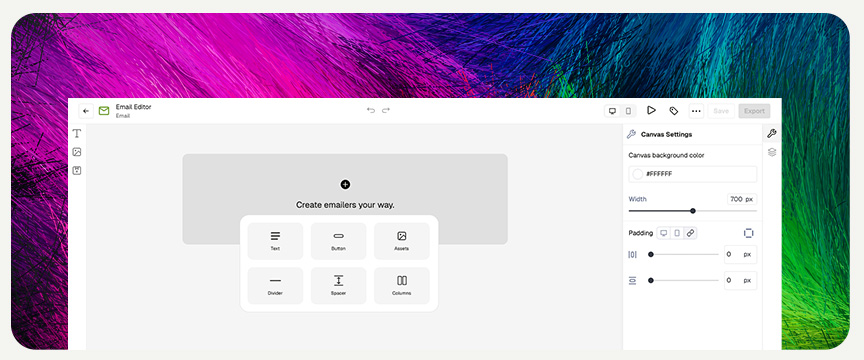
In today’s inbox‑crowded world, every pixel counts. Marketers and creative teams need tools that let them prototype, iterate, and deliver beautiful, responsive emails faster—without getting bogged down in code. That’s why we built our Email Editor: a no‑code, drag‑and‑drop canvas that bridges the gap between creative vision and developer hand‑off.

🚀 Key Features of the Email Editor

1. Drag‑and‑Drop Section‑Based Canvas
  • Speed & Flexibility: Arrange text, assets, and buttons in seconds.
  • Visual Clarity: See your layout come together in real time—no HTML debugging required.
2. 12‑Point Column Grid System
  • Precision Layouts: Divide your template into up to 12 columns for perfect alignment.
  • Flexible Structures: Mix and match columns (e.g., two 6‑point columns) to create side‑by‑side content blocks.
3. Mobile/Desktop Toggle Views
  • Responsive Previews: Switch between device modes to ensure your email looks flawless on every screen.
  • Design Confidence: Catch layout issues early—before you export or send.
4. One‑Click HTML Export
  • Developer‑Friendly: Export a clean HTML file that your frontend team can immediately implement.
  • Seamless Handoff: Eliminate version mismatches by sharing the exact code generated by the editor.

🎯 Benefits for Creative Teams and Marketers

  1. No-Code Email Design
    Designers can focus on creativity, not syntax. Build complex layouts without writing a single line of HTML.
  2. Improved Collaboration
    Creative and development teams speak the same language—your exported HTML matches the visual mockup exactly.
  3. Error Reduction
    Minimize hand‑off mistakes and reduce QA cycles by delivering pixel‑perfect code every time.

🛠 How the Email Editor Works

  1. Start with a Template or Blank Canvas
    Choose from pre‑built designs or begin from scratch.
  2. Add & Arrange Sections
    Drag section blocks (headers, images, text, CTAs) onto the vertical canvas.
  3. Structure with Columns
    Click to split a section into up to 12 columns, then drag content into each column.
  4. Optimize Responsiveness
    Use the Mobile/Desktop toggle to fine‑tune layouts for different devices.
  5. Export as HTML
    Hit “Export” to download a ready‑to‑hand‑off HTML file for your development team.

📢 Beta Details & Roadmap

  • Availability: Turn on the Email Editor (Beta) today from the Beta Settings page—available on all plans.
  • Current Limitations:
    • No reusable components (e.g., global headers/footers) yet.
    • Exported file is a design hand‑off, not a sendable email.
  • What’s Next: Based on your feedback, we’re prioritizing:
    • Component Libraries for reusable sections
    • Advanced Styling Controls (custom fonts, dynamic content)

🎬 Get Started Today

Ready to revolutionize your email design workflow?

Enable Beta: Head to Settings > Beta Features and toggle on Email Editor.

Stay ahead in the inbox with a faster, smarter way to craft responsive email templates. Your developers—and your subscribers—will thank you!

In today’s inbox‑crowded world, every pixel counts. Marketers and creative teams need tools that let them prototype, iterate, and deliver beautiful, responsive emails faster—without getting bogged down in code. That’s why we built our Email Editor: a no‑code, drag‑and‑drop canvas that bridges the gap between creative vision and developer hand‑off.

🚀 Key Features of the Email Editor

1. Drag‑and‑Drop Section‑Based Canvas
  • Speed & Flexibility: Arrange text, assets, and buttons in seconds.
  • Visual Clarity: See your layout come together in real time—no HTML debugging required.
2. 12‑Point Column Grid System
  • Precision Layouts: Divide your template into up to 12 columns for perfect alignment.
  • Flexible Structures: Mix and match columns (e.g., two 6‑point columns) to create side‑by‑side content blocks.
3. Mobile/Desktop Toggle Views
  • Responsive Previews: Switch between device modes to ensure your email looks flawless on every screen.
  • Design Confidence: Catch layout issues early—before you export or send.
4. One‑Click HTML Export
  • Developer‑Friendly: Export a clean HTML file that your frontend team can immediately implement.
  • Seamless Handoff: Eliminate version mismatches by sharing the exact code generated by the editor.

🎯 Benefits for Creative Teams and Marketers

  1. No-Code Email Design
    Designers can focus on creativity, not syntax. Build complex layouts without writing a single line of HTML.
  2. Improved Collaboration
    Creative and development teams speak the same language—your exported HTML matches the visual mockup exactly.
  3. Error Reduction
    Minimize hand‑off mistakes and reduce QA cycles by delivering pixel‑perfect code every time.

🛠 How the Email Editor Works

  1. Start with a Template or Blank Canvas
    Choose from pre‑built designs or begin from scratch.
  2. Add & Arrange Sections
    Drag section blocks (headers, images, text, CTAs) onto the vertical canvas.
  3. Structure with Columns
    Click to split a section into up to 12 columns, then drag content into each column.
  4. Optimize Responsiveness
    Use the Mobile/Desktop toggle to fine‑tune layouts for different devices.
  5. Export as HTML
    Hit “Export” to download a ready‑to‑hand‑off HTML file for your development team.

📢 Beta Details & Roadmap

  • Availability: Turn on the Email Editor (Beta) today from the Beta Settings page—available on all plans.
  • Current Limitations:
    • No reusable components (e.g., global headers/footers) yet.
    • Exported file is a design hand‑off, not a sendable email.
  • What’s Next: Based on your feedback, we’re prioritizing:
    • Component Libraries for reusable sections
    • Advanced Styling Controls (custom fonts, dynamic content)

🎬 Get Started Today

Ready to revolutionize your email design workflow?

Enable Beta: Head to Settings > Beta Features and toggle on Email Editor.

Stay ahead in the inbox with a faster, smarter way to craft responsive email templates. Your developers—and your subscribers—will thank you!

Articles

GPT-5.6 Has Landed: Sol, Terra and LunaHeading
Article

GPT-5.6 Has Landed: Sol, Terra and Luna

OpenAI's new model family is live in Pencil. Which tier to pick for each job.

Ethical GenAI for Enterprise Brands
Article

Ethical GenAI for Enterprise Brands

A first-of-its-kind package helping brands adopt GenAI responsibly.

Pencil Partners with Adobe
Article

Pencil Partners with Adobe

Adobe Firefly now integrates directly into the Pencil platform.

Pencil Launches on Google Cloud
Article

Pencil Launches on Google Cloud

Enterprise teams can now access Pencil through Google Cloud Marketplace.