Topaz Labs AI Enhancement Is Now Live Inside Pencil
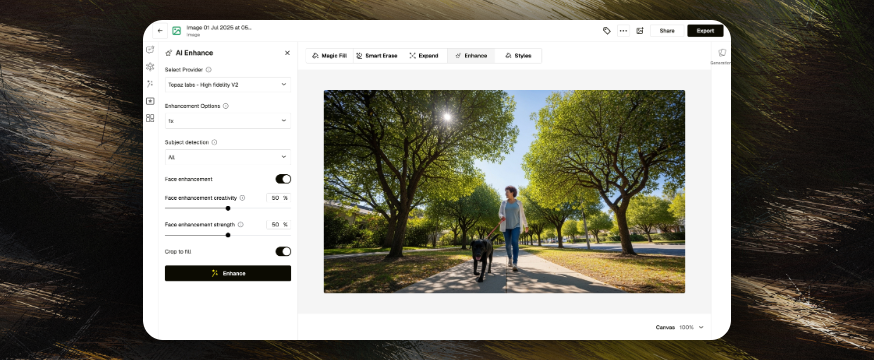

We’ve just added a powerful new engine to Pencil’s Enhance tool — Topaz Labs, the industry leader in AI image and video enhancement.
Whether you're restoring old footage, refining creative assets, or simply making your work look its best, Topaz brings a new level of quality and control to your workflow — no studio needed.
What’s New
With Topaz now available inside Pencil, you can unlock:
- 8K image upscaling
- Cinematic video enhancement
- Denoising and artifact cleanup
- Focus correction and facial refinement
- Slow motion and frame deduplication
- Realistic grain control and anti-aliasing
Topaz joins a growing list of enhancement providers in Pencil, giving you more choice, better quality, and complete creative control — all in a single dropdown.

Image Enhancement, Reimagined
Topaz introduces High Fidelity V2, a model designed to preserve texture, realism, and fine detail. It’s perfect for high-resolution creative work, from product shots to portraits.
You can fine-tune enhancement settings like:
- Subject focus (foreground, background, or all)
- Optional face enhancement with adjustable strength
- Creativity sliders to match your brand aesthetic

Smarter Video Workflows
With Topaz video enhancement, Pencil users now have access to clean, cinematic output for everything from social content to commercial work.
Key capabilities include:
- Upscaling to 2K
- Support for multiple frame rates and video types
- Smart cleanup (halo, noise, blur, compression)
- Motion smoothing and slow motion (2x, 4x)
It’s the perfect companion for bringing archive footage up to spec or adding polish to modern content.
No Setup, No Install
Using Topaz in Pencil is simple:
- Open the Enhance tool
- Choose Topaz Labs from the provider dropdown
- Adjust your settings
- Click Enhance
That’s it. No installs, no plugins, no fuss.

Built for Creative Professionals
Topaz enhances what you already do best — giving you faster results, more flexibility, and studio-grade polish with every click.
Recommended use cases:
- Portrait retouching
- TV & print-ready exports
- Social video cleanup
- Slow-motion editing
- Clarity restoration
Try It Now
Topaz Labs is live inside the Enhance tool for all users. If you’re already using Pencil to enhance creative workflows, this update is ready to power up your process — today.
.png)
.png)
.png)
